

Jili777 Withdrawal – Fast, Secure, and Hassle-Free Payout Guide
After winning at Jili777, you can withdraw your funds to your wallet with just a few simple steps. The Jili777 Withdrawal process is straightforward, and if you’re not sure how to do it, the guide below will walk you through each step in detail and highlight important notes to ensure a smooth transaction.
Guide to Withdrawing Your Winnings on Jili777
Use this withdrawal guide to cash out safely and without delays. Completing each step in the correct order helps prevent mistakes and speeds up transaction processing.
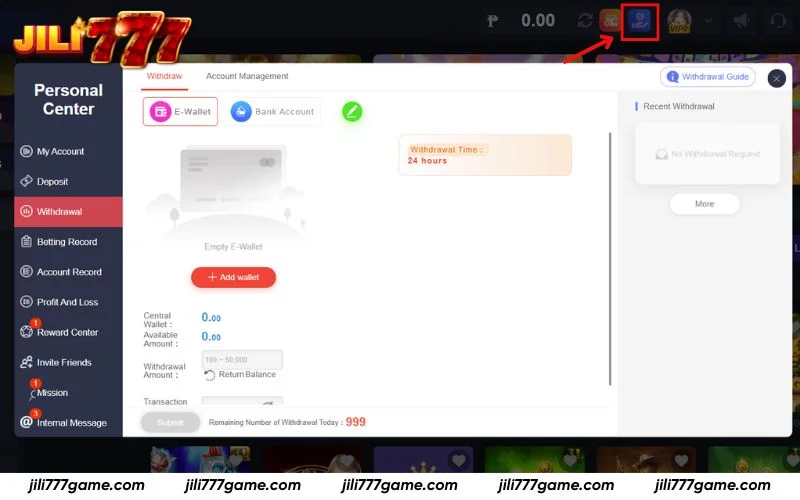
Step 1: Open the Withdrawal Menu
Click the Withdraw button on the top bar next to your account icon. You will see multiple payment options such as GCash, Maya, Online Banking, and GrabPay. Select your wallet and continue by entering the withdrawal amount.
Step 2: Connect your payout account
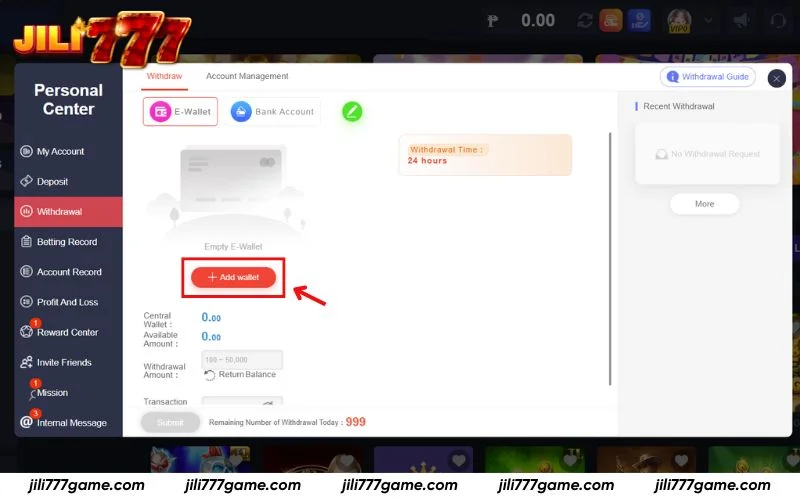
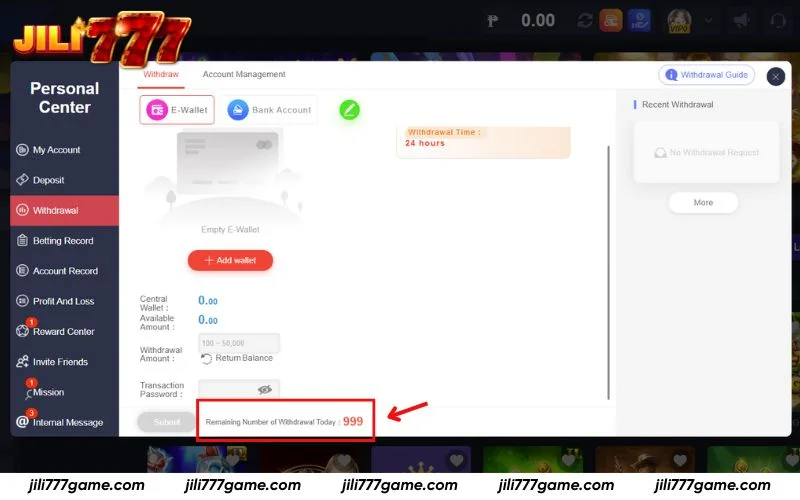
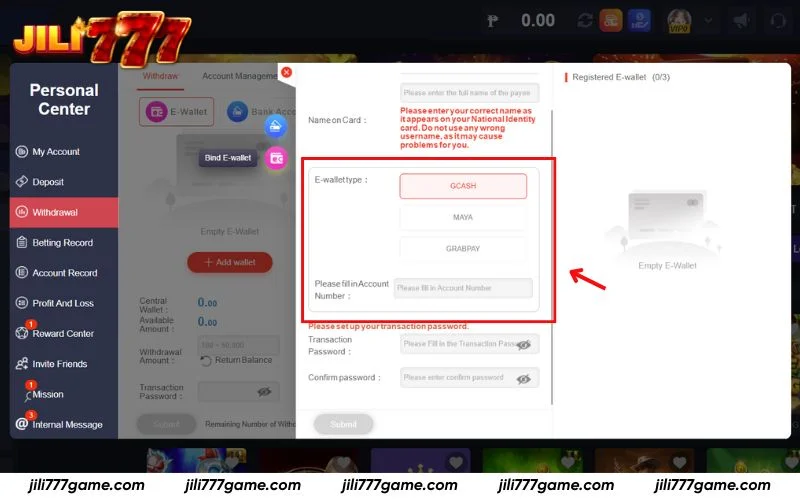
Jili777 allows withdrawals via E-Wallets or Bank Accounts. To begin, click the Add Wallet button on the withdrawal page. Provide your valid wallet or bank details depending on your preferred method.
After adding your account successfully, the system will store your payout information, allowing future withdrawals to be completed in seconds.
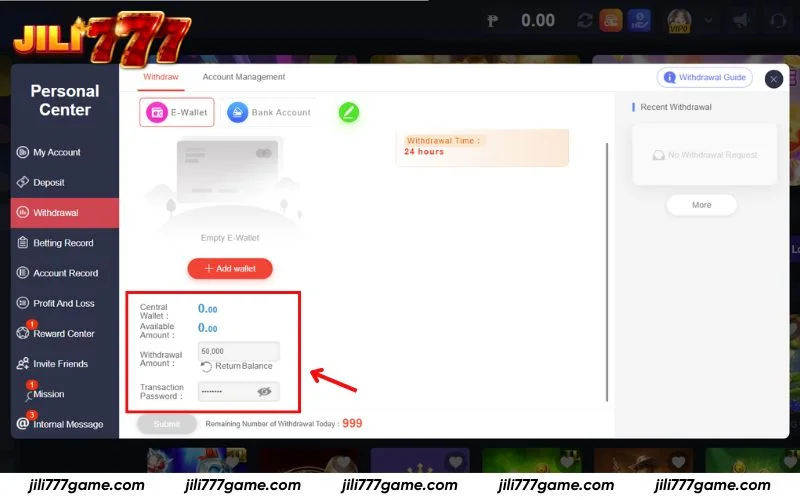
Step 3: Type your withdrawal amount and enter the security password
Input the amount you wish to withdraw in the Withdrawal Amount field > Then enter your secure Transaction Password to authorize the withdrawal > Finally, press Submit to send your withdrawal request successfully.
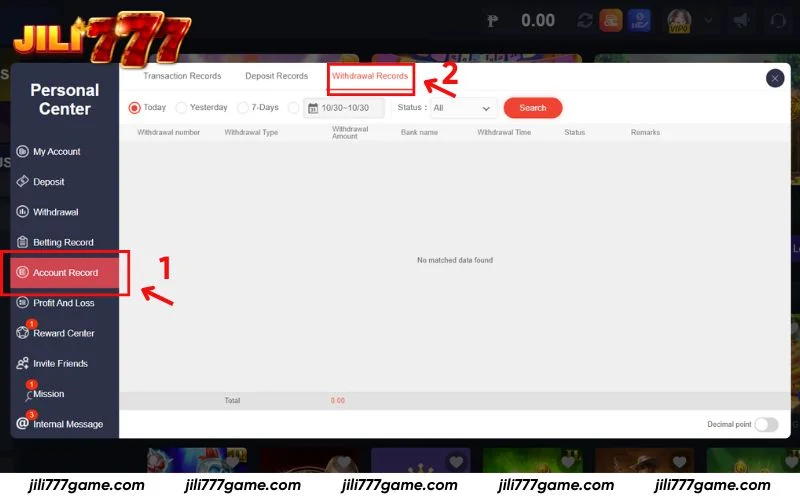
Step 4: Review withdrawal activity
After confirming your withdrawal, head to the Account Record section in the sidebar. Click Withdrawal Records to view all requests, including pending, completed, or cancelled transactions. Use this page to stay informed and make sure your funds are arriving on time.
Key reminders before you withdraw funds
To make your withdrawal experience seamless at Jili777, take note of the following tips. These reminders help prevent system holds, delays, and unnecessary errors during the payout process.
- Request withdrawals during active bank hours: Jili777 may process funds faster when banks are online. Night-time or holiday withdrawals may require extra time depending on bank schedules.
- Match your registered account information: All withdrawals must go to an account that matches the verified profile on Jili777. Transactions to someone else’s wallet or bank may be declined for security reasons.
- Complete any active bonus turnover: If you joined a promotion, ensure the wagering requirement is fulfilled before withdrawing to avoid system rejection.
- Daily withdrawal limit: Jili777 provides multiple withdrawals per day. You can see your available remaining withdrawal count directly in the withdrawal panel.
FAQs about Jili777 withdrawal
Have questions about how withdrawals work at Jili777? Here are clear explanations to help you withdraw without delays and enjoy a worry free experience.
How long does a Jili777 withdrawal usually take?
Withdrawals at Jili777 typically take 1 to 5 minutes to complete. In rare cases such as banking traffic, connection issues, or system checks, processing may require up to 30 minutes but funds are still delivered securely.
Can I withdraw my winnings to GCash on Jili777?
Absolutely. Jili777 supports GCash cash-outs. Head to your payment settings, add your GCash wallet, then select it when withdrawing. Enter the amount you want to cash out and confirm to finalize your transaction.
How can I confirm if my Jili777 withdrawal went through?
Go to Account Record > Withdrawal Records to track your cash-out request. The page will display your withdrawal history and update the status in real time once the transaction completes.
Does Jili777 support PayPal or other e-wallet withdrawals?
At the moment, Jili777 offers withdrawals via GCash only. Support for PayPal or additional e-wallets has not yet been enabled.
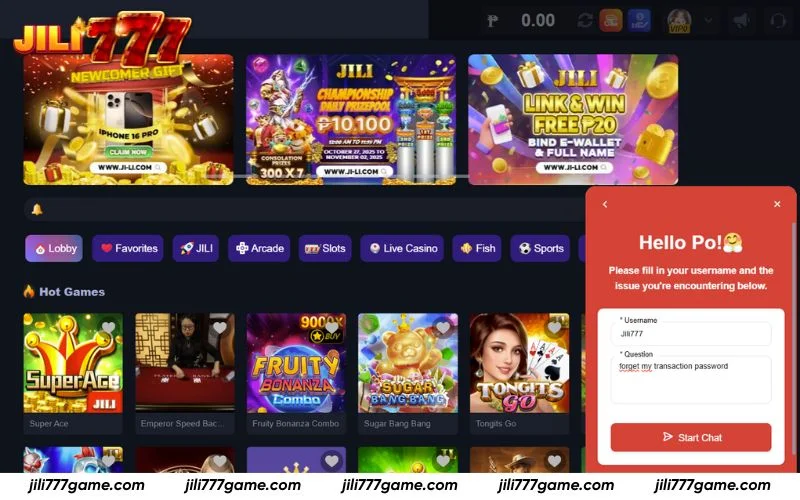
What should I do if I forget my transaction password?
Should you forget your transaction password, reach out to Jili777 support immediately via live chat, Messenger, Telegram, or hotline. Live chat is the most efficient channel, allowing the support team to verify your details and help you reset the password quickly.
Conclusion
Jili777 ensures a smooth and secure withdrawal journey for every player. Thanks to this guide, you’re fully prepared to cash out your earnings anytime. For questions or assistance, feel free to reach out to the 24/7 customer service team for prompt support.